1. Introduction to Bi-Directional Sync
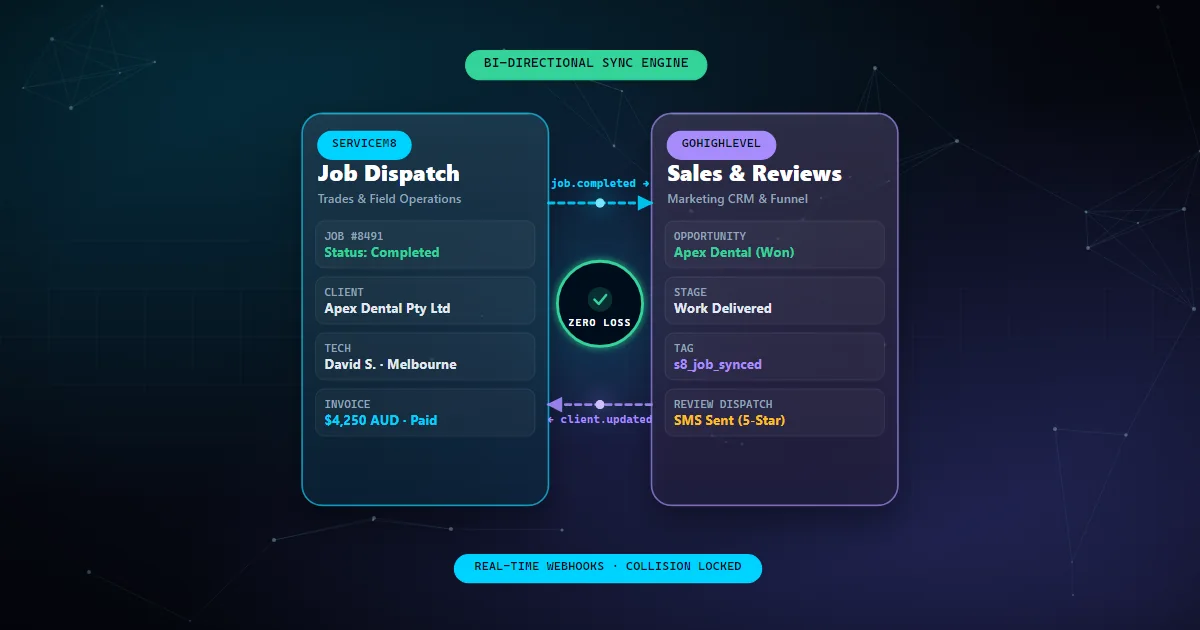
Field service businesses often struggle with data management across multiple platforms. Double data entry is a common issue, wasting time and introducing errors. A bi-directional sync between ServiceM8 and GoHighLevel can solve these problems by ensuring data consistency and improving workflow efficiency.
2. Technical Overview of ServiceM8 and GoHighLevel
Both ServiceM8 and GoHighLevel offer robust APIs that allow for extensive customization and integration. ServiceM8 is designed for operational management, while GoHighLevel focuses on customer relationship management. Understanding their core functionalities and API capabilities is the first step in creating a seamless integration.
3. Setting Up the Integration
To set up the integration, you need to access the APIs of both platforms. Start by registering your application on both platforms to obtain API keys. You can then use these keys to authenticate requests. The integration can be implemented using middleware like n8n, which facilitates data flow between the two systems without manual intervention.
const serviceM8Api = new ServiceM8Api('your-servicem8-api-key');
const goHighLevelApi = new GoHighLevelApi('your-gohighlevel-api-key');

function syncData() {
  const serviceM8Data = serviceM8Api.getData();
  goHighLevelApi.sync(serviceM8Data);
}
4. Handling Data Conflicts and Duplications
Data conflicts and duplications can arise when syncing two systems. Implement conflict resolution strategies, such as prioritizing one source or merging data based on timestamps. Regular audits of the data sync process can help identify and resolve these issues promptly.
5. Best Practices and Future Considerations
Adopting best practices such as regular testing, monitoring, and using version control for your integration code can enhance reliability. As your business grows, consider scalability in your integration approach to accommodate increasing data volumes and complexity.